Everyday AI, set up for you

Less busywork. More life. Let's make AI feel useful.

Picture a helper that reminds you of every bill and appointment, sorts your email, plans your trips and meals, and explains confusing paperwork in plain English. We set it up on the phone and computer you already have, show you how it works, and stay with you until it feels easy. No tech skills needed.

The intro call is free, about 15–20 minutes, and there is no pressure to book paid work afterward.

Neuronaut astronaut relaxing in a Hawaiian shirt and sunglasses
Scroll

Real help with everyday life

Forget the hype. Here's what a well set-up AI assistant can quietly take off your plate, starting this week.

  • Never miss a bill or appointment

    Gentle reminders on your phone for bills, prescriptions, birthdays, and doctor visits — before they sneak up on you.

  • An inbox that sorts itself

    Important messages float to the top, junk steps aside, and long emails come with a short, plain summary.

  • Trips and meals, planned for you

    A day-by-day trip plan and packing list, or a week of dinners you'll actually like — with the grocery list to match.

  • Keep up with family and grandkids

    Catch up on a busy family group chat, write a heartfelt card, or turn old photos into a story to share.

  • Paperwork in plain English

    Medical bills, insurance letters, and fine print explained simply — plus the right questions to ask before you call or sign.

  • Spot scams before they spot you

    Not sure about a text, email, or caller? Learn a quick way to check it with your assistant before you click, reply, or pay.

  • A personal assistant on your phone

    Just ask, out loud or by typing: "What's on my calendar Thursday?" "Remind me to call Mom." "What does this letter mean?"

  • A patient helper for anything new

    Recipes, gardening, a new hobby, or that gadget you never figured out — explained step by step, as many times as you like.

  • Get hours back each week

    Hand off the small, repetitive chores, so more of your week goes to the people and things you enjoy.

You don't need all of these. On a free intro call, we'll pick the two or three that would make the biggest difference for you.

Book a free intro call

We can help you understand a document and prepare questions. We are not doctors, lawyers, or financial advisors, and we'll say so when a question belongs with one.

AI is powerful. Setting it up yourself is the hard part.

Lots of people try an AI app once, get a strange answer, and give up — or worry about what they just shared. The difference is in the setup: the right tools, connected safely, tuned to your life, and explained so you feel in charge.

🧩
We handle the confusing part We choose the right tools, set them up, and connect them, so you skip the trial and error
🔒
Safe from day one We never ask for your passwords, money stays read-only, and you approve every connection
📱
Your devices, plain English On the phone, tablet, or computer you already use. No jargon, and no question is too basic
🤝
We stay until you're confident We practice together, leave you a written guide, and stay a message away
NN
Brian Roccoforte
Founder · Personal AI setup & training

Neuronaut is led by founder Brian Roccoforte, who spent 10+ years in Customer Success leadership, most recently building and scaling a CS team from 7 to 28 people at a leading AI technology company. His career has been about making sophisticated technology easy for real people to use, and our team brings that same patience to you.

Plain English Safe setup Your pace Real results
7→28
CS team built
10+ yrs
Leading CS teams

Four simple steps

No homework and nothing to prepare. Just come ready to talk about what you'd like to be easier.

01

A free, friendly chat

15–20 minutes about your week, what you'd like help with, and any worries about privacy or "breaking something."

02

A simple plan

We pick the few things worth setting up for you, and tell you what to skip.

03

We set it up together

On your own phone and computer, at your pace. You approve every connection, and nothing is taken over.

04

You practice until it's easy

You try it while we're there, keep a written guide, and know how to reach us when you want more.

Clear rules, so you can relax

AI is useful, and it is also a place where scams and over-sharing happen. We'll go slowly, and we'll set a high bar for anything that touches your email, calendar, or money.

🔑
We will never ask for your passwords Not for email, not for banking, not "so we can set it up for you." You type them only into the official sign-in screen, if we connect something.
👀
Read-only for money If we connect a financial account at all, it is a limited, read-only view you approve — never a connection that can move money. You can turn it off later.
🚫
What never goes into a chat Full Social Security numbers, bank passwords, one-time passcodes, or a request to "send money to be safe." We'll teach you to spot those asks.
↩️
You can undo everything Every connection we make is something you can review and revoke. We'll show you where those settings live.
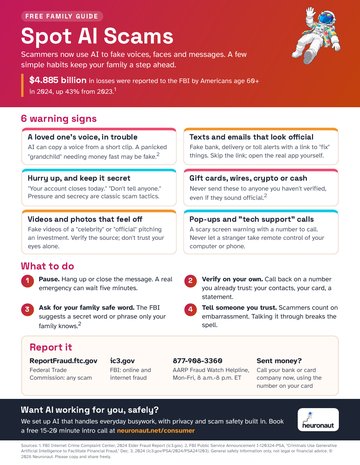
Preview of the Spot AI Scams one-page guide
Free guide

How to spot an AI scam

A one-page checklist for fake calls, texts, and emails. Tell us where to send it. Print it for the fridge, or share it with someone you love.

Some assistants can connect to your calendar, email, or financial accounts through an official, permissioned hookup — a bit like signing into an app with "Allow access," not by pasting a password into a chat. You see what is being asked for, you approve it, and you can revoke it. For banking and money, we will only consider connections that let you look at information (for example, to help categorize spending or prepare questions for an advisor). We will not set up a connection that can send a payment, open an account, or change your personal details. If a tool can't meet that bar, we won't use it.

Pick the level of help that fits

Every option is private, hands-on work with an expert, in plain English. Not sure which fits? Start with the free intro call.

🎯

Private deep-dive session

$500 · 90 minutes

A 90-minute private session, on video or in the San Diego area. We pick the one thing that would help you most — say, a sorted inbox, a reminder system, or a phone assistant — and start setting it up live on your own accounts. You leave with it working, a written recap, and a clear next step. If you move into Personal AI implementation within 30 days, the $500 is credited in full.

90 minutes, private and one-on-one Set up on your real accounts, not a demo Written recap and a plan Full credit toward Implementation within 30 days
🛠️

Personal AI implementation

$3,000 · 2–3 weeks

Our most complete package. Over two to three weeks we set up your personal AI helper on the devices you already use: reminders, email sorting, planning help, and careful connections to email, calendar, and — if you want — a read-only view of financial accounts. We coach you until you can run and adjust it yourself, and leave you a written guide. Three 90-minute sessions, setup work between them, and 30 days of follow-up questions.

Three private sessions over 2–3 weeks Your assistant and time-savers, built with you Safe connections to email, calendar, and optional read-only financial accounts Written guide + 30 days of follow-up
🔄

Ongoing AI coaching

$1,000 / month

Your own AI expert, month after month. We keep everything working and keep making it better. Usually follows Implementation.

Two 1-hour sessions a month, at home in San Diego County or by video Text or email us anytime — we reply within 1 business day We keep your setup running and add new things as you go Your household is included A checkup every 3 months Stay 3 months to start, then cancel anytime
👥

Private group workshop

$2,750 · about 3 hours, up to 8 people

A private half-day (about three hours) for a family, a close group of friends, a club, or a community group — up to 8 people. We plan the session around what the group wants to do, practice live, and cover safety, including scams to ignore. Everyone leaves with notes they can use. Ask us about a larger group.

Private group, up to 8 people, about 3 hours Custom agenda, practiced live Safety and scam-awareness segment Notes everyone can take home

Good to know: AI app costs are separate

Our prices cover our time and expertise. Any AI apps you choose (like ChatGPT, Claude, Gemini, or Microsoft Copilot) are billed by those companies, in your own name. Many people do just fine with the free versions, so the extra cost is often $0. Upgraded personal plans usually run about $5 to $20 a month. We'll help you decide whether an upgrade is worth it, and you can cancel those plans anytime.

Not sure which is right? Start with a free 15–20 minute intro call — no charge, no pressure. Prefer to just write? Email brian@neuronaut.net and tell us what you'd like help with. We'll suggest a way in, and a time.

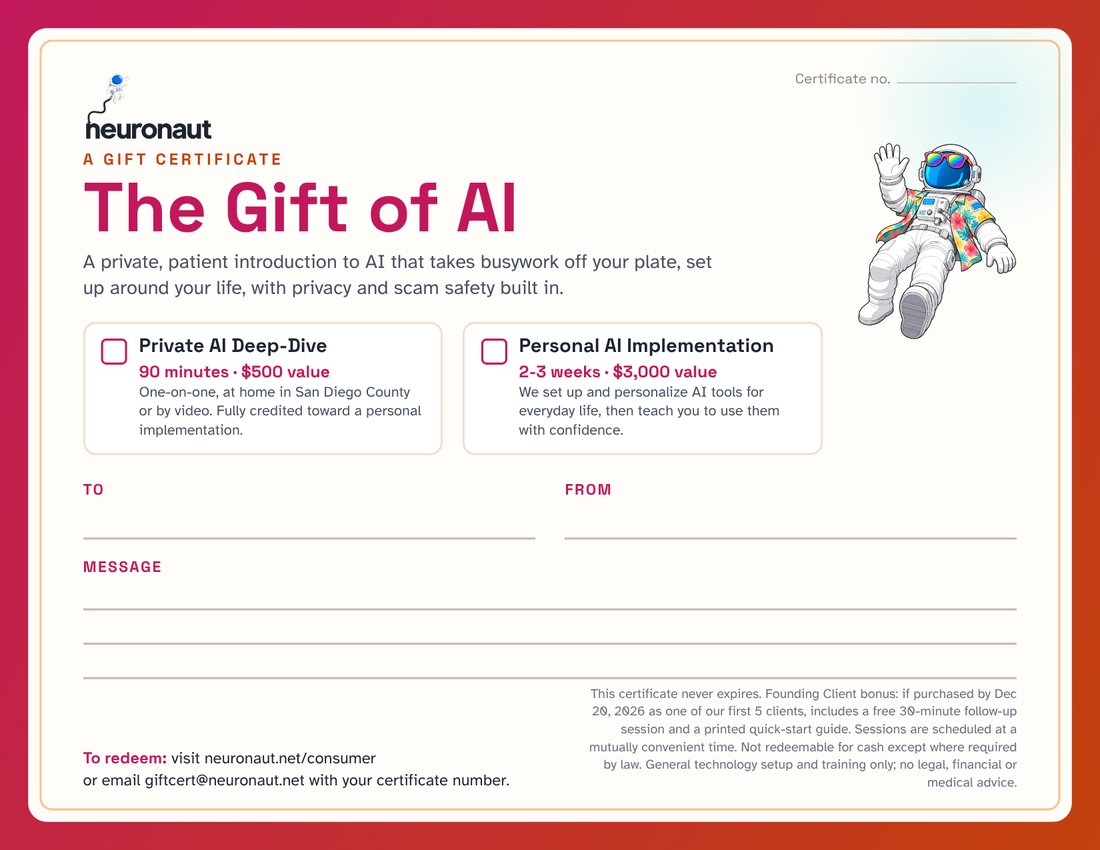
The Gift of AI certificate from Neuronaut, with spaces for To, From, and a message

Give the gift of AI

Know someone who'd love a little help? Give them a private, patient session with our team.

  • Private Deep-Dive$500
  • Personal AI Implementation$3,000

Never expires · Covers our time, not AI app subscriptions · Redeem at giftcert@neuronaut.net

Founding Client bonus: our first 5 clients by Dec 20, 2026 also get an extra 30-minute session and a printed quick-start guide.

Ready when you are

Tell us a little about what you'd like help with — even if it's just "I keep hearing about AI and I don't know where to start." We can start with a free 15–20 minute intro call, no charge and no pressure. Or email us or use the form. We're based in San Diego, CA, and we work with people near and far.

📍
Location Available Worldwide · Based in San Diego, CA
💼

Send a message